HomeBotsHistoryRefer & earn📺 Tutorials⚙️ Settings guide💬 SupportAdmin
FAST • SECURE • RELIABLE

Your WhatsApp bot, online in 60 seconds.

WhatsApp bot hosting Kenya. Enjoy seamless deployment, automated session management, real-time logs, instant restarts, and powerful bot controls on one streamlined dashboard. Pay seamlessly with Card, M-Pesa and other Mobile Money options.

WhatsApp support
Pay with:CardM-PesaAirtel Money

Powerful Features for Smarter Bot Hosting

Everything you need to deploy, manage, and grow your WhatsApp bots — all in one place.

1-Click Deployment

Get your bot online in seconds with our simple setup.

Secure Sessions

Your data and sessions are protected 24/7.

Real-Time Logs

Monitor activity and troubleshoot instantly.

Instant Restarts

Keep your bot running without downtime.

Full Bot Control

Manage logs, settings, restart, and update your bot anytime.

Flexible Payments

Pay with Card, M-Pesa, or Airtel Money.

Bring Your Own Bot

Use your own bot from GitHub or choose from our supported bots.

Referral Rewards

Earn wallet credit for referring friends.

Simple 4-Step Process

Get Started in Minutes

1Create Account

Sign up for a free account in seconds.

2Add Wallet Money

Use M-Pesa or Airtel Money to fund your wallet.

3Pick a Bot

Get your session ID instantly.

4Deploy

Name your bot, paste the session ID and go live!

Ready to deploy your WhatsApp bot?

Join thousands using BotFleet Host for fast, secure and reliable bot hosting.

WhatsApp support
Wallet balanceKES 0
🪙 0 coins
Bots running0 / 0
Next renewalNone
CommissionKES 0
Get started0%

    Your bots

    No bots yet. Browse bots

    Choose a bot

    Tutorials

    Watch short videos and read quick answers to get your bot running.

    Videos

    Videos are coming soon.

    Getting started

    How do I deploy my first bot?

    1) Tap Add money on the Home tab. 2) Open the Bots tab, pick a bot and tap Get session ID. 3) Scan the code on its pairing site and copy your session ID. 4) Tap Deploy, choose a plan, give your bot a name, paste the session ID and tap Pay and deploy. It goes live in 1 to 3 minutes.

    How do I get a session ID?

    Every bot has its own pairing site. Tap Get session ID on the bot's card, scan the code with WhatsApp (Linked devices), and copy the session ID it gives you.

    What name can I give my bot?

    3 to 30 characters: lowercase letters, numbers and dashes, starting with a letter, for example blackmd-01. Each name can only be used once.

    Payments

    How do I add money?

    Tap Add money on the Home tab, choose M-Pesa or Airtel Money, enter an amount and tap Pay now. Your wallet updates when the payment succeeds. If it does not, log in again and it is checked automatically, or message support with your payment reference.

    How much does it cost?

    One bot costs KES 50 per month. Paying for 3 or 6 months at once gives you a discount.

    How do promo codes and vouchers work?

    Tap Add money, type your promo or voucher code in the code box and tap Apply code. A promo code works once per account and may expire or run out. A voucher is prepaid wallet credit that can be used once.

    Can I get a refund?

    Read our Refund policy. If a deployment fails to start, your money is returned to your wallet automatically.

    Your bots

    My bot went offline. What do I do?

    Tap Manage on your bot, open Logs and read the last lines. If the session expired, get a new session ID, open the Session tab and paste it. You can also tap Restart.

    My bot settings reset after a restart

    Open Manage, then the Database tab, and tap Enable database. After that, set your settings once and they will stay.

    How do I renew my bot?

    Tap Renew on your bot and choose 1, 3 or 6 months. You can also leave Auto-renew ticked, and it renews from your wallet when it is due. We email you before it expires.

    What happens if I do not renew?

    The bot stops when its time runs out. Top up your wallet and tap Renew to start it again.

    Can I add my own bot?

    Yes. Open the Bots tab, tap Add your own and paste the link to a public GitHub repo. Once it is approved you can deploy it like any other bot.

    Your account

    How do I change my name, photo or password?

    Tap your profile picture at the top of the page.

    How does Refer & earn work?

    Open the Refer & earn tab, copy your link and share it. When a friend signs up with it and makes their first top-up, you earn commission. Once it reaches KES 50 you can withdraw it to M-Pesa, or move it to your wallet to pay for bots.

    How do I install the app on my phone?

    On Android Chrome, tap the menu (three dots) and choose Install app or Add to Home screen. On iPhone Safari, tap Share and choose Add to Home Screen. The BotFleet icon then opens the site like an app.

    How do I contact support?

    Open the Support tab and tap New ticket. We reply there and email you. You can also chat with us on WhatsApp with the green button.

    Still stuck? We are happy to help.Ask on WhatsApp
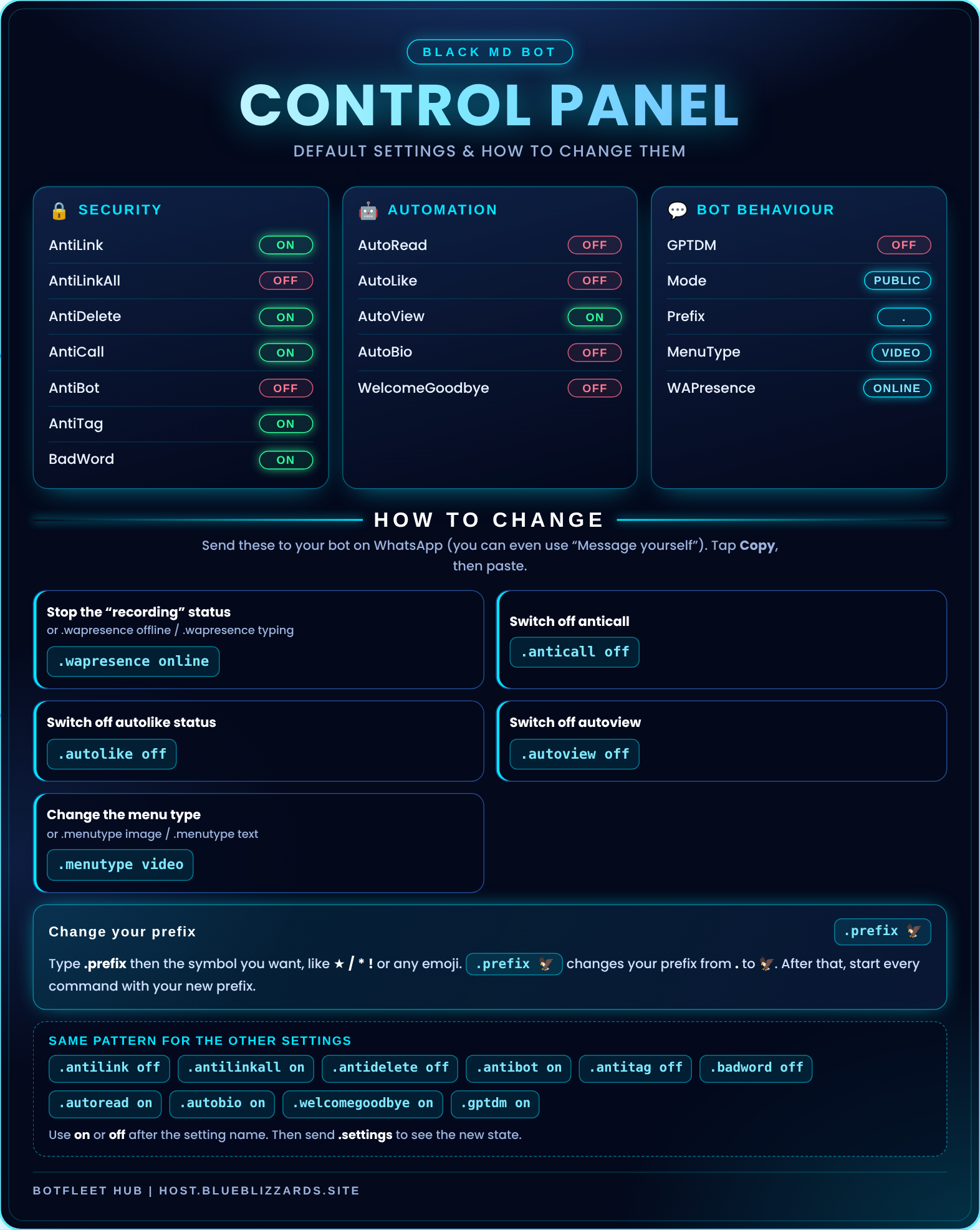
    BLACK MD BOT

    CONTROL PANEL

    Default settings & how to change them

    🔒Security

    • AntiLinkON
    • AntiLinkAllOFF
    • AntiDeleteON
    • AntiCallON
    • AntiBotOFF
    • AntiTagON
    • BadWordON

    🤖Automation

    • AutoReadOFF
    • AutoLikeOFF
    • AutoViewON
    • AutoBioOFF
    • WelcomeGoodbyeOFF

    💬Bot behaviour

    • GPTDMOFF
    • ModePUBLIC
    • Prefix.
    • MenuTypeVIDEO
    • WAPresenceONLINE

    HOW TO CHANGE

    Send these to your bot on WhatsApp (you can even use “Message yourself”). Tap Copy, then paste.

    Stop the “recording” statusor .wapresence offline / .wapresence typing.wapresence online
    Switch off anticall.anticall off
    Switch off autolike status.autolike off
    Switch off autoview.autoview off
    Change the menu typeor .menutype image / .menutype text.menutype video
    Change your prefix.prefix 🦅

    Type .prefix then the symbol you want, like ★ / * ! or any emoji. .prefix 🦅 changes your prefix from . to 🦅. After that, start every command with your new prefix.

    Same pattern for the other settings
    .antilink off.antilinkall on.antidelete off.antibot on.antitag off.badword off.autoread on.autobio on.welcomegoodbye on.gptdm on
    Use on or off after the setting name. Then send .settings to see the new state.
    BotFleet Hub⬇ Save poster

    Support

    Send us a message and we will reply here. You can also chat with us on WhatsApp.

    No tickets yet.
    Prefer WhatsApp?Chat on WhatsApp

    History

    Download a statement or CSV of what is shown here. Clearing removes the list from this page; BotFleet keeps payment records for accounting.

    DateTypeAmountNote

    No activity yet.

    Refer & earn

    Share your link. When a friend signs up and makes their first top-up, you earn KES 20 commission. Once it reaches the minimum you can withdraw it to M-Pesa, or move it to your wallet to pay for bots.

    Your commission
    KES 0

    Top referrers this month

    #NameReferrals

    No referrals yet this month. Be the first!

    🤝
    Friends joined0
    ✅
    Friends who paid0
    💸
    You earnedKES 0

    Admin

    Bots

    NameOwnerStatusDue
    Last 30 days: top-ups (cyan) and sign-ups (dots)
    Announcements
    Email all users
    BotFleet Coins 1 coin = KES 10

    Deployment cost in coins (leave a box empty to follow the KES price)

    Packages (price = coins x coin value; bonus coins are free)

    NameCoinsBonusPriceOrder

    What Paystack accepts

    CurrencyStatusMethodsOffer

    Exchange rate

    Heroku accounts

    Each month: add the new API key, then move the bots that are still paid for. Keep the old key here until all its bots are moved.

    AccountBots (live / all)

    Vouchers (prepaid wallet credit)
    CodeValueStatus
    Promo codes
    CodeValueUsedStatus
    Export
    Tutorial videos

    Activity log

    WhenAdminActionDetails

    Support tickets

    SubjectUserStatusUpdated

    Withdrawal requests

    DateUserAmountM-PesaStatus

    Bots: deployments and revenue

    BotDeploymentsRevenue (current bots)

    New users per week

    Week startingNew users

    Reviews to moderate

    BotUserReview

    Custom bot requests

    BotUserStatus

    Payments

    DateUserAmountStatus

    Users

    EmailBalanceBots
    WhatsApp support Email us

    Log in

    Continue with GoogleContinue with GitHub

    By continuing you agree to the Terms, Privacy and Refund policies.

    or use email

    Forgot password?

    Back to log in

    Resend code

    Open your authenticator app and type the 6-digit code for BotFleet. No phone with you? Use one of your backup codes.

    Back to log in

    Deploy

    Step 1: open the pairing site and scan with WhatsApp. Step 2: copy the session ID it gives you.

    Numbers that can change this bot's settings from WhatsApp. Up to 2, with country code, no + or spaces, separated by a comma.

    Renew your bot

    Pay for more months at once and save. Time is added to what you have left.

    Add your own bot

    Paste the link to a public GitHub repo. Only add bots you trust and that follow WhatsApp's rules. New bots are checked before you can deploy them.

    New ticket

    Screenshot

    User

    Choose your country

    It decides which currencies and payment methods we show.

    🪙 Buy BotFleet Coins

    1 coin = KES 10. Use coins to deploy and renew bots. You have 0 coins.

    Add money

    Choose a plan when you deploy or renew

    Wallet deposits are in KES. Prefer coins? Buy BotFleet Coins

    How do you want to pay?
    Add money (KES)
    50100250500

    Reviews

    Deploy this bot to leave a review.

    📢 Announcements

    Close

    Your profile

    JPG or PNG. We resize it for you.


    Appearance

    Language

    EnglishKiswahili
    Switch account

    Accounts you add stay signed in on this device. Only add accounts on a phone or computer you trust.

    Two-step login
    Notifications

    We remind you by email and notification 3 days and 1 day before a bot is due.

    Recent logins

    We alert you by email and notification when a new device signs in. Not you? Change your password. Removing a device means you are alerted when it signs in again.

    Change password
    Delete account

    This removes your bots and personal data. Any wallet balance or commission is lost. It cannot be undone.

    Manage

    LogsSettingsVisualSessionDatabaseUpdate